





Browser & AI Extensions

Turn the web into a research workspace.

Whether you're annotating sources, building an outline, or taking your research into AI — our extensions keep everything organized, cited, and anchored to where it came from.

Trusted at leading schools and universities globally
Harvard University Graduate School of Design Wilson College Las Positas College Nicolet College Kishwaukee College Los Medanos College AMDA
Extensions & integrations

Everything you need to research, anywhere you work.

From browser-based annotation to AI-powered conversation — PowerNotes keeps your work organized and attributed, whatever tool you're in.

Browser extensions
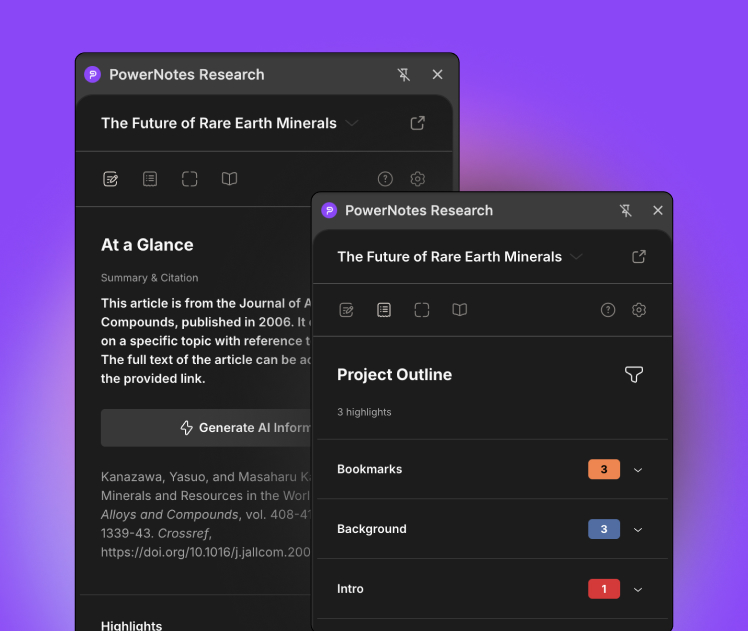
PowerNotes Researcher extension

PowerNotes Researcher

The full-featured research extension. Highlight and annotate sources across any website, PDF, or database — with topic organization, automatic citation capture, and a project outline that builds as you research.

Built for sustained research projects: Extended Essays, theses, dissertations, law review, case preparation.
PowerNotes Clipper extension

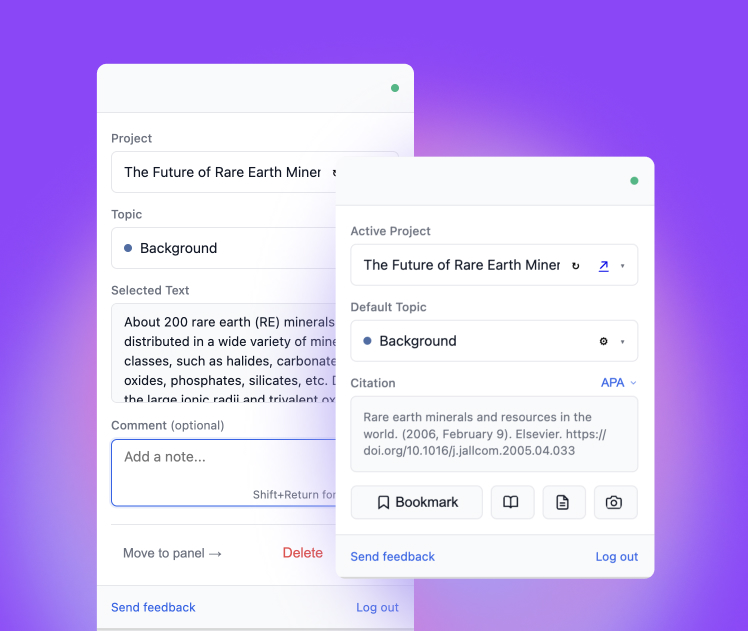
PowerNotes Clipper

A lightweight extension for fast, focused source capture. Highlight, annotate, and save to your PowerNotes projects without breaking your browsing flow.

Ideal for heavy reading sessions where you need to capture quickly and organize later.

AI integrations
Coming soon

Claude Integration

Work with your PowerNotes sources, highlights, and annotations directly within Claude. Every conversation starts grounded in your own research — not a blank prompt.

Coming soon

ChatGPT Integration

Work with your PowerNotes research directly within ChatGPT. Your annotated sources and notes available as context in every conversation.

The platform
Available now

PowerNotes Workspace

The full end-to-end research platform. Everything the extensions capture, organized in one place — with LMS integration, SSO, AI governance, and institution-wide deployment.

For institutions and classrooms that want structured research at scale.

LMS integration: connects to Canvas, Moodle, D2L Brightspace, and Blackboard
AI governance: every AI interaction is logged and available for supervisor review
SSO: log in with your institution credentials — no separate account required
Library integration: database results surface alongside web results during student searches
What's included

12 capabilities. One research workflow.

Everything you need to go from source discovery to finished, cited work — without switching between tools.

Persistent Highlighting
Highlight and annotate directly on web pages and PDFs. Color-coded highlights and notes saved to your projects — persistent across sessions and devices.
Fast Bookmarking
Save sources for later without annotating. Eliminates the pile of open tabs and ensures nothing gets lost between research sessions.
Citation Management
Source metadata captured automatically when you save. Format citations in APA, MLA, Chicago, Bluebook, and other major styles with a single click — no manual entry.
Screenshot Capture
Capture visuals, charts, or figures through the integrated screenshot tool. Screenshots are automatically linked to their source URL and stored in your project with citation.
Integrated Library Search
If your institution is registered with PowerNotes, library database results appear alongside web results when you search. Vetted academic sources surfaced when you need them.
Institutional
Accurate Legal Citations
When researching on Westlaw or LexisNexis, PowerNotes automatically captures inline citations for every highlight and annotation. No copy-paste, no errors.
Mobile Support
PowerNotes supports Mobile Safari. Highlight, annotate, and save sources on your phone or tablet with the same structure and traceability as desktop.
Integrated Reader View
A streamlined reading view that works seamlessly across articles and PDFs. Highlights, annotations, and citations stay anchored to the source regardless of how the page renders.
Project-Based Workspaces
Everything you capture is anchored to a project — keeping research scoped, organized, and ready for the outline stage. Switch between projects without losing context.
Source-Grounded AI
Whether you use AI within PowerNotes or connect your projects to Claude or ChatGPT, every conversation is grounded in the sources you've actually saved. Not a blank prompt. Not hallucinated sources.
SSO Support
If you're at a supported institution, your university credentials work across PowerNotes, the browser extensions, and the Claude integration.
Institutional
LMS Integration
Connect to PowerNotes through Canvas, Moodle, D2L Brightspace, and other major learning management systems — directly from your course dashboard.
Institutional

Your research. Organized everywhere you work.

Install the Researcher extension and start capturing sources today — or explore the full PowerNotes platform to see how it all fits together.

Book a demo — it's free Explore the platform →